One line presentation
If you're looking to manage a large number of slides for displaying song lyrics in ProPresenter, especially when you want to show just one line per slide. Instead of creating separate slides for each line, consider using the "Build In" feature to display each line one at a time. This way, you can have one slide per song, and as each line is sung, it can appear in sequence. To do this, create a single slide for each song and then add each line as a separate build. You can set the timing for each line to appear automatically or manually as you click. fnaf
Sorry, but I didn't explain myself adequately. I don't use ProPresenter, we use Easyworship and I would like to do the one line per slide in Easyworship, but don't see an easy way to do it. I'm looking for the Easyworship fix, if there is one.

Terry Stout
Edit the song in EW and then click where you want to break the slide and do a CONTROL + ENTER to create a slide for each line,
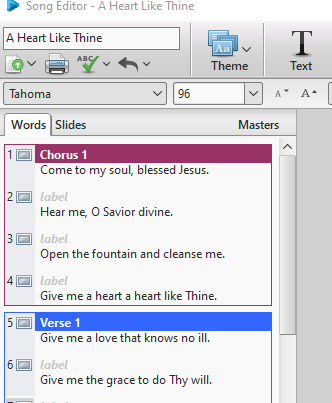
Thanks for the reply Terry, but as I said in my original post we'll have 4 maybe 5 songs and breaking each line song to a separate slide we could end up with 50 slides, which would be a little too much to keep up with.
Guess we'll keep 4 to 5 lines on each slide, which works well.
yeah i ran into same issue before, honestly easyworship just not built for geometry dash that one line style like propresenter. 50 slides gets messy real quick. prob better stick with few lines per slide or it gonna be hard to control during service
Mình gặp một lỗi khá khó khăn khi sử dụng EasyWorship để trình chiếu video trong buổi nhóm: âm thanh vẫn chạy nhưng màn hình lại bị Màn hình đen, không hiển thị gì cả. Ban đầu ý tưởng làm tệp video bị lỗi, nhưng thử nhiều tệp khác vẫn gặp tình trạng tương tự.
Sau khi kiểm tra kỹ năng hơn, mình phát hiện nguyên nhân có đến từ xung đột đồ họa hoặc thiết lập hiển thị trong phần mềm. Việc chuyển đổi giữa chế độ kết xuất hoặc cập nhật trình điều khiển đôi khi giúp giải quyết. Ngoài ra, tôi cũng thử kiểm tra màn hình bằng một nền đen đơn giản như Black screen để xác định xem vấn đề nằm ở phần video hay toàn bộ màn hình hệ thống.
If ai gặp lỗi tương tự, có thể thử các cách trước khi cài đặt lại phần mềm. Đây không phải là lỗi lạ và thường liên quan đến cấu hình hơn là nội dung tệp.
********************************
I encountered a rather tricky issue while using EasyWorship to play a video during a group meeting: the audio played normally, but the screen went black and didn’t display anything. At first, I thought the video file was corrupted, but trying other files resulted in the same problem.
After investigating further, I discovered the cause was likely a graphics conflict or display settings within the software. Switching rendering modes or updating the drivers sometimes helps resolve the issue. Additionally, I tested the screen with a simple black background like "Black Screen" to determine whether the problem was with the video itself or the entire system display.
If anyone encounters a similar error, they can try these methods before reinstalling the software. This isn’t an uncommon issue and is typically related to configuration rather than the file content.
David Ferguson
I watch churches display one line of a song and most use ProPresenter. My worship leader normally will sing 4, maybe 5 songs. Now if I break these up to a single line on each slide I may have 50 slides in a presentation. I don't see an EASY way to display a single line for each song.
I'm a diehard Easyworship advocate and have used it for many years
Any suggestions??